Posts

List of all the Chromebook that will be able to run android apps

Image
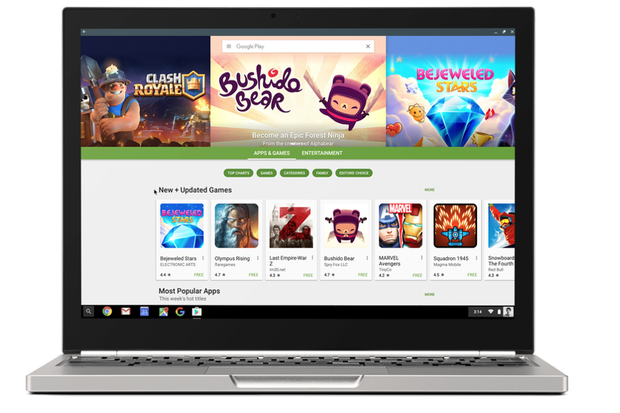
We all know that recently google has released a software update for the chrome books which made them to run android apps on them and now Google has released the list of compatible Chromebooks that will be getting this feature. Google chrome page states that “Chromebooks have always been about making computing more accessible for everyone, and by bringing together the best of Android and Chrome OS, we are taking a big leap forward.” As we know the first chrome book to get this feature was Asus Chromebook R11/ C738T Asus Chromebook Flip and Google’s Chromebook Pixel (2015). From these three android apps are available on M53 Developer channel for Asus Chromebook Flip right now. The other two devices will be able to access soon. The main companies to get this feature are listed below these are: Acer, Asus, Google, Dell, Samsung, HP, Lenovo, AOpen, Bob...
Enjoying the features of android TV on your PC

Image
Most of the modern Smart TV’s come with the android system installed in them. Android TV is just an operating system which is installed in the Smart TV’s. This operating system is based basically on the same code which is used in the smartphones but instead of a smartphone’s user interface it consist of a redesigned custom interface which makes it easier to be used on a big screen TV with the help of a remote control. Previously the only way to enjoy and test the features of the android TV was to buy a TV or a Television Box that runs the software. But now there is an alternative. You can try these features on your pc by installing an unofficial version of the Android TV on any Computer. One thing to keep in mind before proceeding is that this is an unofficial version may contain some minor or even major bugs. The installation procedure is pretty easy. You may install it the same way you install any other Linux distribution on your PC. If you don’t want to take this mu...

NFC Payment finally supported by Wallet 2.0

Image
Well Microsoft finally decides to push the much awaited feature to their customers the functionality to pay through NFC using Wallet app 2.0 but unfortunately the feature is for the insider preview fast ring users only. Any person who is subscribed in the fast ring of the insider previews will be getting a Wallet app update to version 2.0 which will allow them to pay their bills using NFC. Wallet was leaked earlier this month but the windows central has reported that the app is now live for insider of the fast ring. According to windows central reports the feature will be coming packed to the regular consumer this year with the Redstone release. With this step Microsoft is trying to catch up with Apple and Google. Being late in this area Microsoft is trying to get benefit from this step. You will be able to pay at any retailer who already supports Tap to Pay functionality. If apple Pay and Google Wallet works, then Wallet will work (as soon you have saved your credit card ...

Chromebook + Android Apps is it really ready

Image
As we all know that google has recently launched the feature to use android apps in Asus Chromebook Flip. Most of the users like me and probably you out there have been waiting for this feature for a long time but is it really ready for the mainstream use. Google has made it possible to use around 1.5 million and plus apps to run on chrome OS and yes you can use many of them if not all but let’s first talk about if it really worth the try. Installing the apps ant using them on chrome OS is simple procedure and most probably the support for the devices will be expanded by the end of this summer. During the test run of the apps on my Chromebook some were pretty flawless while some of them were not able to perform as well. The only bad news till now is that the only device that supports this new feature is Asus Chromebook Flip in the next few weeks the support for the device may most probably include the 2015 Chromebook Pixel and Acer Chromebook R11 not any official announcements but let...

iOS 10’s Ten hidden features that apple didn’t reveal at WWDC

Image
A week before apple hosted its Worldwide Developer Conference and revealed the latest features of iOS 10 that we will be getting in September. While apple revealed all the usual features that we have been expecting but the main things that get a user exited is the hidden features. These features are generally revealed weeks after the launch of first beta version of the OS as user gets some time to explore the new features. Below is the list of 10 hidden features iOS 10 will come packed with. Never forget where you parked: iOS 10 maps app drops a pin wherever you park your car and will show it to you as a recommended place whenever you leave your office, mall, home, cinema’s etc. Deleting the default apps: While the apps don’t actually get deleted but you can remove the icon from the home screen and can delete user data too from you iPhone. Not all the apps can be deleted from the phone but some apps like Calculator, Calendar, Stocks, Maps, iTunes Store etc. can...

Google Photos Introduces a New Slideshow Option

Image
There are almost 200 million google photo users out there and the google is continuously working in making their user experience much and much better day by day. The continuous updates being delivered to their users giving them new features to explore. Yet another feature has been rolled out to the Google Photos app the ability to show slideshow. It is now very much possible to show slide show to your friends and relatives without bothering to click every time for the next picture. Just open any album click on any picture and tap on slideshow from the dropdown menu. On Thursday Google photos team said on Google+ it’ll automatically advance through the photos, though the photo stops the show. The service is available on the Android app and the website, but not the iOS app for Google Photos. In order to compete with services such as Flickr and Apple’s Photo app, the Tech Giant has been constantly rolling out new set of features to its Google Photos App. Some of the example...

Windows 10's Refresh Tool Get Rid of Bloatware.

Image
A month ago a news was in the air that soon enough Microsoft will be releasing a tool which will help user to clean install their operating system helping the user in getting rid of all the bloatware that come preinstalled in the third party machines. Recently in the new build of Windows 10 insider preview (build 14367 to be specific) this tool was seen integrated in the recovery menu of the OS well not fully integrated as you see in the picture below there is a link in the recovery settings menu which takes you to a Microsoft page from where user can download the tool. unfortunately any try to use the tool in older version of the OS was a complete failure. The tool named as “Refresh Windows” is not exactly what I expected it to be instead of offline refreshing of the windows this tool downloads an image of the Latest Windows and then installs it – which a user can already do with the Microsoft’ Media Creation Tool. Some of you out their might ...